 ShipZen
App Store Pricing by Country: A Worked PPP Example
Updated September 20, 2026 · by Sardorbek Rakhimov
Apple's automatic pricing generates local storefront prices comparable to the price in your base country or region. It accounts for exchange rates, certain taxes, and local pricing conventions, but it is not an income or affordability model. This guide covers the actual App Store Connect mechanics, then walks a reproducible purchasing-power example you can rerun with your own base price.
How App Store pricing actually works
- You pick one base country or region and a price from up to 800 price points by default; Apple lets you request 100 additional higher price points, up to $10,000. Apple: Set a price.
- Apple generates comparable prices across the 174 other storefronts and 43 currencies, factoring in exchange rates, certain taxes, and each region's pricing conventions. Apple: Set a price.
- Apple periodically adjusts automatically generated prices as taxes and exchange rates change, but not the base storefront price; Apple says it notifies you in advance. Apple: Set a price.
- You can manually manage prices for selected storefronts, but Apple will no longer make automatic adjustments in those storefronts while they remain manually managed. Apple: Schedule price changes.
- Price changes can be scheduled ahead of time. Changing the base country or region deletes scheduled price changes, which Apple asks you to acknowledge before confirming. Apple: Edit the base country or region.
- To sell a paid app, the Account Holder must accept the current Paid Apps Agreement. Apple separately requires banking and applicable tax information to receive proceeds.
App Store Connect therefore supports country-specific manual pricing. The remaining decision is what to set those prices to.
The worked example: $9.99, five countries
For a reproducible illustration, this guide uses the World Bank's economy-wide PPP conversion factor and official exchange rate. Dividing the first by the second produces the World Bank's GDP price-level ratio relative to the market exchange rate. This is a scenario input, not a direct measure of an individual's income or willingness to pay. These are the 2024 inputs:
| Country | PPP factor | FX rate |
|---|---|---|
| India | 20.4522 | 83.6693 |
| Türkiye | 11.5545 | 32.8059 |
| Brazil | 2.4837 | 5.3889 |
| Poland | 1.9494 | 3.9808 |
| Mexico | 9.9166 | 18.3049 |
Applying the method below to a US$9.99 reference price produces:
| Country | Price level vs US | US-price-level equivalent | PPP scenario |
|---|---|---|---|
| India | 24.4% | $40.87 | INR 204.32 (US$2.44) |
| Türkiye | 35.2% | $28.36 | TRY 115.43 (US$3.52) |
| Brazil | 46.1% | $21.68 | BRL 24.81 (US$4.60) |
| Poland | 49.0% | $20.40 | PLN 19.47 (US$4.89) |
| Mexico | 54.2% | $18.44 | MXN 99.07 (US$5.41) |
Reading it: under this GDP-level model, a US-dollar-equivalent $9.99 in India corresponds to $40.87 at US price levels. The PPP scenario is the other endpoint: $9.99 multiplied by the ratio, or by the PPP factor for the local-currency figure. Neither endpoint is a recommended App Store price.
Inputs and method: base price B = US$9.99; World Bank
indicators PA.NUS.PPP
(local currency units per international dollar) and
PA.NUS.FCRF
(local currency units per US dollar), 2024 observations retrieved August 31, 2026. Let
R = PPP / FX. The US-price-level equivalent is B / R; the local
PPP scenario is B × PPP; its US-dollar equivalent is B × R.
Both API responses reported a July 13, 2026 update date when retrieved. Input values are
shown to four decimals, ratios as one-decimal percentages, and currency outputs to two
decimals; the linked API responses retain full precision. These analytical outputs
ignore Apple price-point availability, local tax treatment, commission, and currency
changes after 2024. GDP-basis PPP is an economy-wide statistic, so use it as one input
rather than a demand forecast.
Setting the actual override
- Choose a documented test scenario. Decide where to place the price between Apple's automatically generated price and your PPP scenario. The midpoint is one experiment, not an industry standard.
- Select an available price point in App Store Connect's per-storefront pricing sheet. The calculated amount may not be an Apple price point, and Apple's customer price also reflects local pricing conventions and certain taxes. Apple: Set a price.
- Prioritize by observed exposure: compare the affordability gap with your own territory-level sales and conversion data. Apple documents territory views for App Analytics.
- Re-check manually managed storefronts on a schedule. Apple stops making automatic tax and exchange-rate adjustments there, so the assumptions can drift. Apple: Schedule price changes.
The honest risks
- Storefront switching incentives: a large gap can encourage customers to seek another storefront. Apple says a customer's Apple Account country or region determines where they can purchase apps. Apple: Manage availability.
- Support economics: model support cost per customer separately from proceeds; a lower price does not automatically lower the cost of serving that customer.
- Perception cuts both ways: regional pricing reads as fairness in the discounted market and can read as unfairness in the expensive one if surfaced carelessly.
Where ShipZen fits
Manually reviewing many of the App Store's 175 storefronts can become repetitive. ShipZen, a native macOS App Store Connect client, models PPP-aware price recommendations across territories against Apple's real price points, and previews every change in the native Review Price Changes sheet before anything is applied. You can override individual territories before reviewing the plan. Applying generated pricing strategies requires Pro; manual price adjustments are available in Free. The final Apply Changes confirmation sends the update to Apple.
A planner example with a manual Japan override
This actual ShipZen screen uses demo data and a separate US$4.99 base price, not the US$9.99 analytical example above. PPP + Floor is selected with a US$1.99 floor. Six territories are shown, four have proposed price changes, and Japan is manually kept at JPY 800.
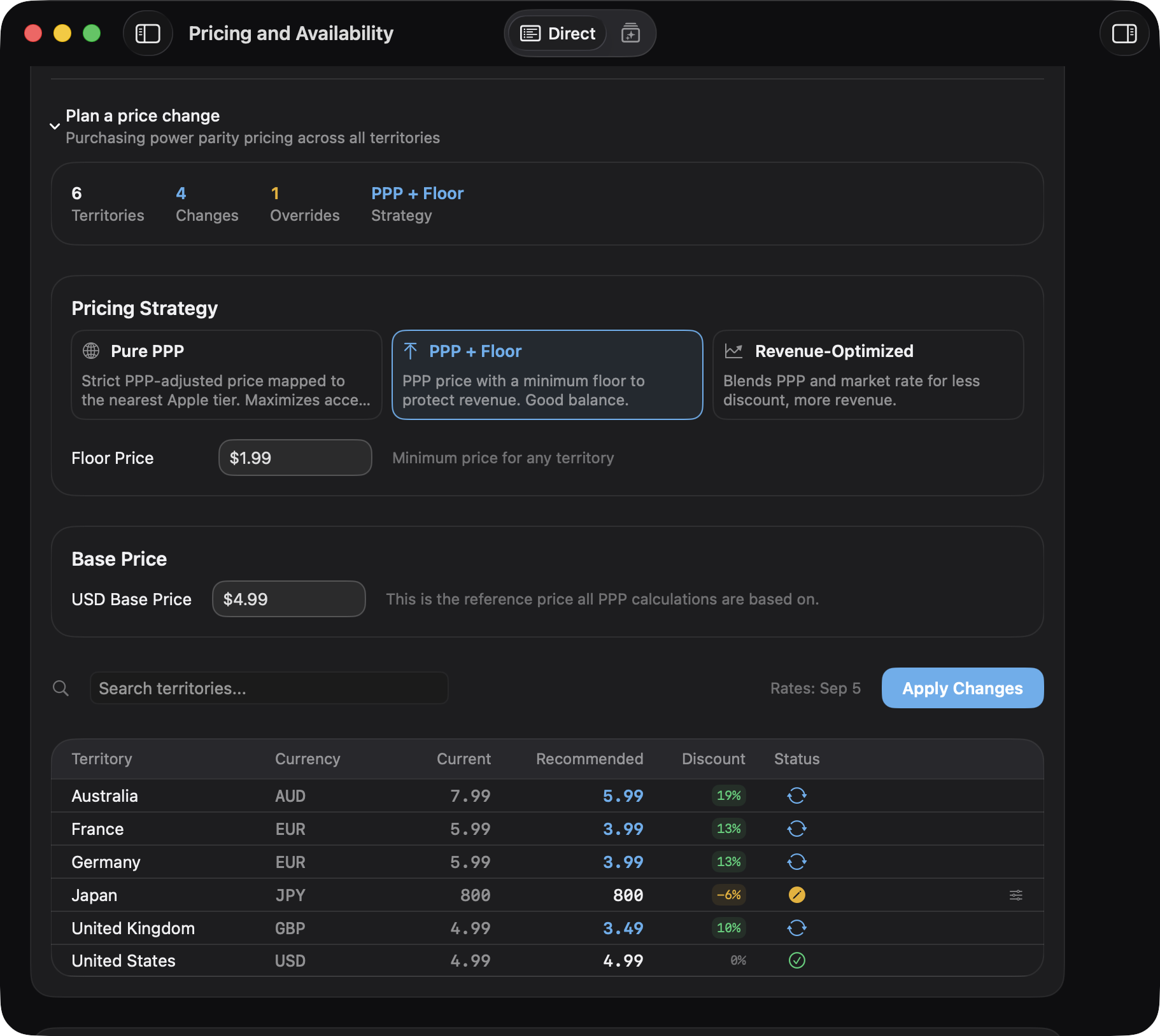
- Preview a strategy in Pricing and Availability, then check the proposed territory prices.
- Keep a territory-specific decision. In this example, the Japan override stays at JPY 800 instead of accepting the generated recommendation.
- Review before applying. Open Review Price Changes and confirm only the intended updates. Previewing is available in Free; applying a generated strategy requires Pro.
This demonstrates how to inspect and override a plan. It is not a claim that these demo prices improve conversion or revenue.
Sources and verification
Verified August 31, 2026 against Apple's current App Store Connect pricing documentation and the linked World Bank 2024 API observations. The calculations are editorial examples, not Apple recommendations or financial advice. See About ShipZen for authorship and verification practices, and Security for the product's access and write-approval boundaries.
Preview regional pricing strategies in Free. Review territory prices and your overrides before applying a generated strategy with Pro.
Download on the Mac App StoreAvailable on the Mac App Store.