 ShipZen
Dynamic Mode for App Store Connect
Product capability · updated September 8, 2026 · by Sardorbek Rakhimov
ShipZen's Dynamic Mode is a generative UI for App Store Connect. Describe a supported task and it assembles a native, task-specific workspace from App Store Connect data available through Apple's official API: a table, form, checklist, chart, diff, or pricing grid. See, edit, and approve every proposed change in that same workspace. Metadata changes reach Apple only after you confirm the diff; other writes use their own confirmation flow.
Describe the task. Get the workspace. Review every proposed change.
App Store Connect is organized around Apple's pages. Dynamic Mode starts with your task. Ask a question or describe an outcome, and ShipZen uses the selected app's current context to assemble the native blocks that make that work easiest to inspect, edit, and continue.
| Describe the task | Get the workspace |
|---|---|
| “Set the subtitle to "Weather at a glance" for all English locales.” | An editable subtitle table. Refine individual values, then open the metadata confirmation diff. |
| “Compare keywords across my English-speaking locales.” | A keyword matrix to inspect each locale and find overlap with its own title or subtitle. |
| “Build a checklist before I submit version 2.1.” | An interactive release-readiness checklist grounded in the current app. |
| Plan prices in Pricing and Availability. | Use the native planner to generate prices, override individual territories, and review the changes. Applying generated strategies requires Pro. |
| “Summarize this TestFlight build.” | A TestFlight summary with relevant build, group, and tester context. |
| “Chart proceeds for the last 90 days.” | An analytics chart instead of a paragraph describing the numbers. |
A real example: update four subtitles, then review the diff
These actual ShipZen screens use synthetic Weather Zen data. The request is: “Set the subtitle to "Weather at a glance" for all English locales.” The example stops at the confirmation sheet; no change was sent to Apple. Select any screenshot to open the complete image.
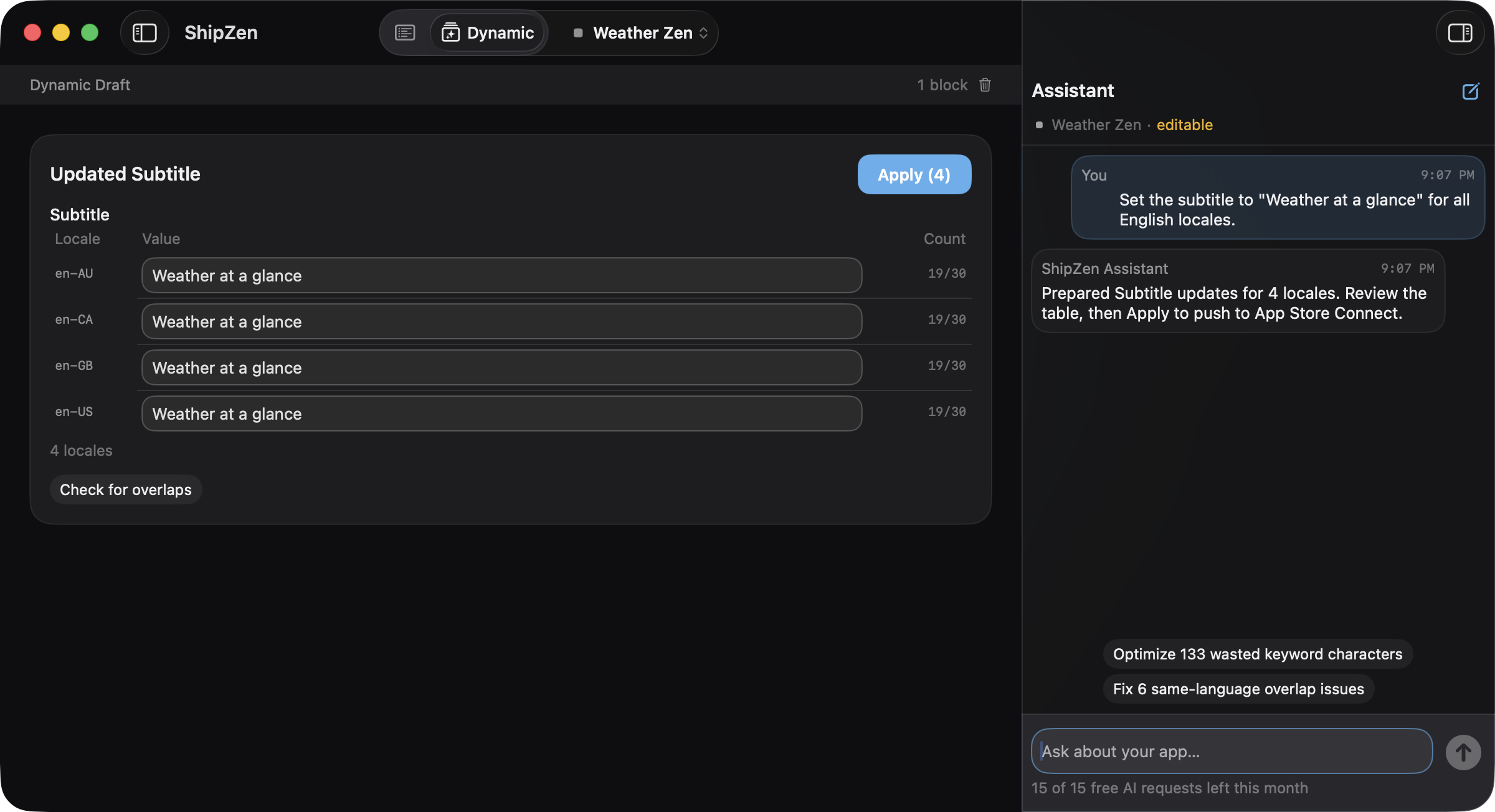
1. Turn the request into an editable table
Dynamic Mode prepares Weather at a glance for en-AU, en-CA, en-GB, and en-US.
Each proposed subtitle is 19 of 30 characters. All four values are visible in the
workspace, ready for you to review or edit.
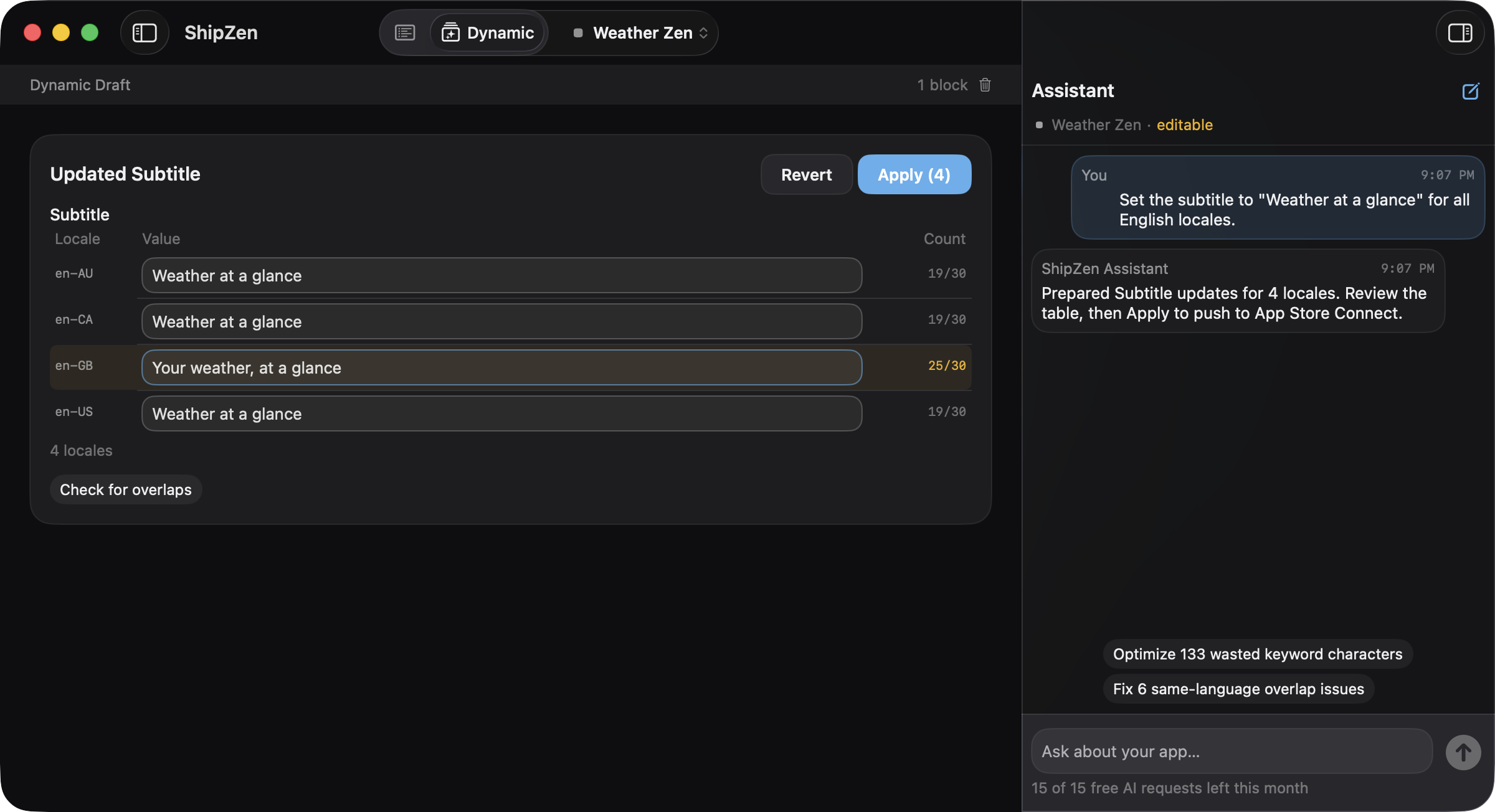
2. Refine one locale without changing the others
Change only en-GB to Your weather, at a glance, using 25 of 30 characters.
The Australian, Canadian, and US English rows keep the original proposed wording.
This is an individual field edit, not a second bulk replacement.
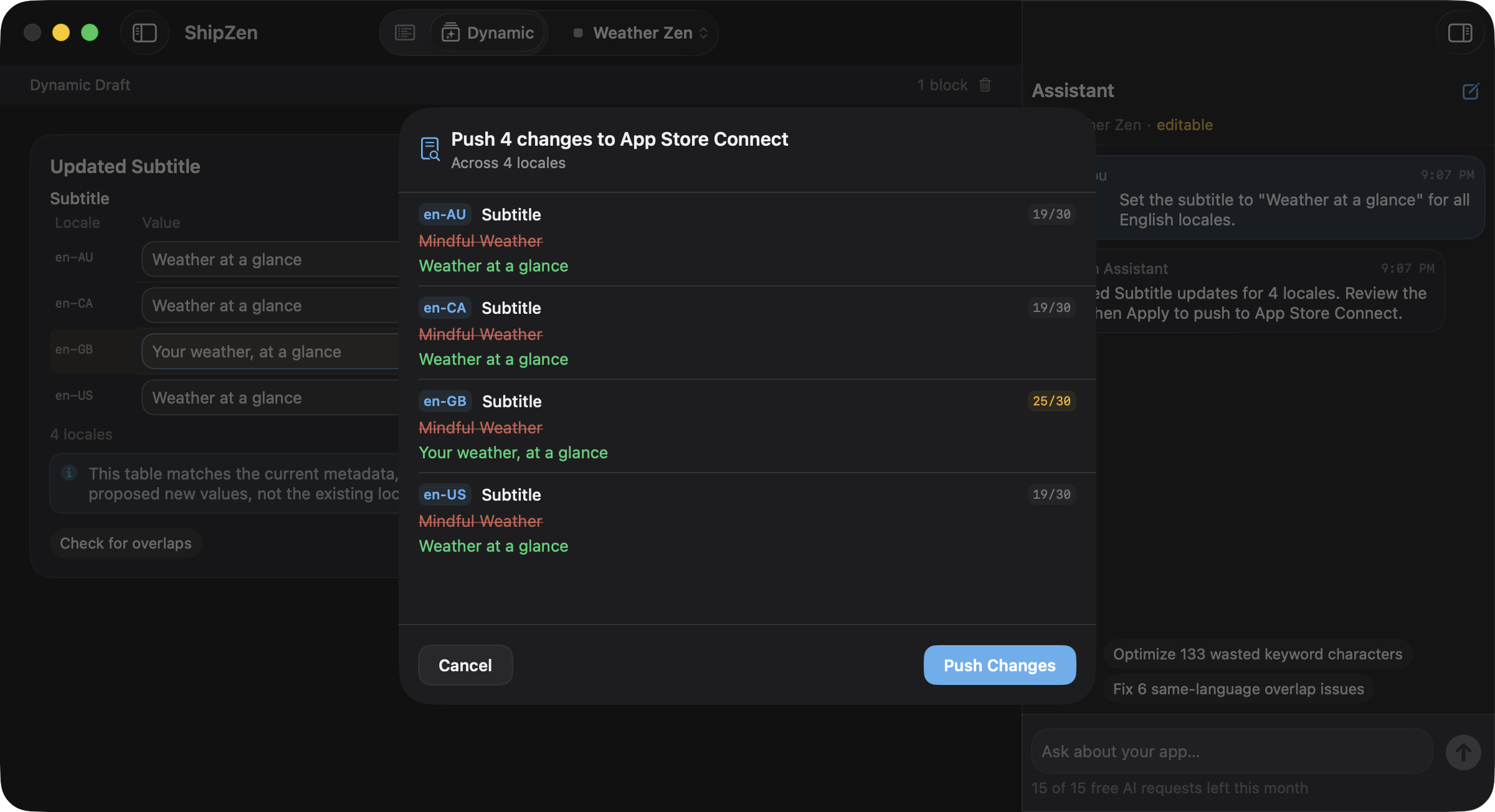
3. Review all four changes before confirming
Apply (4) opens the metadata confirmation sheet. It compares the previous
Mindful Weather subtitle with each proposed value, including the refined en-GB
text. Cancel leaves the changes unsent; Push Changes is the
final confirmation for this metadata save.
For the underlying listing rules, see the App Store Connect localization guide. For other approaches to the same task, compare bulk metadata editing workflows.
A controlled native generative UI
Dynamic Mode does not download arbitrary HTML or execute AI-generated interface code. The model chooses from ShipZen's supported native block library and supplies the data shape appropriate to the request. ShipZen renders those blocks as macOS controls you can inspect and, where supported, edit.
The block library includes forms, checklists, information cards, cross-locale tables, diffs, keyword matrices, summaries, charts, pricing grids, TestFlight summaries, and review summaries. Each block can also offer contextual follow-up actions, so refining the workspace is part of the same conversation.
The generated workspace is a visual safety layer for AI-assisted App Store Connect work. Proposed changes remain visible and editable in native controls, and they reach Apple only after confirmation, with a diff for metadata saves. See ShipZen's security and capability boundaries for the documented distinction between Dynamic Mode writes and direct manual actions.
How Dynamic Mode works
- Describe the App Store Connect task. Ask for the outcome or view you need.
- ShipZen reads the relevant context. It uses the selected app and data available through Apple's official App Store Connect API; Apple's resource coverage and the app's current state determine what can be read or changed.
- Dynamic Mode assembles supported native blocks. The response becomes an interactive workspace rather than a wall of chat text.
- Review and edit. Editable forms, checklists, and tables remain under your control.
- Confirm the write. Applying a metadata table opens the standard metadata diff. Confirm only after reviewing its old and new values.
Direct Mode and Dynamic Mode share one safety model
| Direct Mode | Dynamic Mode |
|---|---|
| Best when you already know the exact field or action. | Best when you know the task but need the right view assembled around it. |
| Navigate a stable App Store Connect-aligned editor. | Describe the task and work through generated native blocks. |
| Make precise manual edits. | Ask AI to analyze, draft, stage, or organize the work. |
| See and approve the full diff before a metadata change reaches Apple. | Review a diff for metadata saves. Other AI-assisted writes require their own confirmation. |
Use your ChatGPT subscription or your own API key
For AI features, sign in with ChatGPT and use the Plus or Pro subscription you already pay for, or supply your own OpenAI or Anthropic API key and pay that provider directly. These are separate access paths: a ChatGPT subscription is not an API key, and plan or provider limits still apply. The free tier includes 15 AI requests a month; ShipZen Pro removes that cap. See the current ShipZen plans and pricing for the monthly and annual options.
AI credentials stay in the macOS Keychain. ShipZen connects to the provider you select rather than proxying, reselling, or marking up AI usage. The security page documents the credential and connection model.
What Dynamic Mode does not mean
- It is not arbitrary UI generation. ShipZen renders supported, audited native block types.
- It is not autonomous saving. AI can draft and stage; you see, edit, and approve what reaches Apple.
- It does not bypass Apple's API boundaries. Agreements, tax and banking, privacy declarations, and other web-only Apple surfaces still open in App Store Connect; Apple's App Store Connect workflow documents those account and business tasks.
- It does not replace Direct Mode. The stable editor remains available for precise manual work.
Common questions
What is generative UI in ShipZen?
It is Dynamic Mode's ability to turn a natural-language App Store Connect task into a task-specific arrangement of supported native blocks, using the selected app's context.
Can Dynamic Mode create any interface?
No. It assembles ShipZen's native forms, tables, checklists, charts, summaries, and other supported blocks. It does not execute arbitrary interface code generated by a model.
Does Dynamic Mode change App Store Connect automatically?
No. AI can analyze, draft, and stage work. You can see, edit, and approve every proposed change in the native workspace, with a diff for metadata saves and confirmation for other writes.
Do I need an OpenAI or Anthropic API key?
Not if you use ChatGPT sign-in with a Plus or Pro subscription. The alternative is to add your own OpenAI or Anthropic API key and pay that provider directly. Dynamic Mode is included in Free. The 15 successful AI requests per calendar month are shared across AI features; Pro removes ShipZen’s cap. Provider limits and any charges still apply.
Sources and verification (2026-08-31). This page describes ShipZen's supported behavior, maintained by the developer named on the About page. Product security, direct-service connections, write-confirmation behavior, and unsupported surfaces are documented on the security and capability page. Apple's current App Store Connect API overview, app-info localization resources, and version-localization resources define the upstream API boundary. Current ShipZen availability and pricing are on the home page and pricing section.
Describe the task. Get the workspace. See, edit, and approve every proposed change.
Download on the Mac App StoreAvailable on the Mac App Store.